
A Journal Through My Activities, Thoughts, and Notes
xfce4-keyboard-settings
Alt+Ctrl+L => xset dpms force off # 一键关掉所有显示器
xfce4-session-settings Application Autostart
Prevent monitor off => 'xset s off; xset -dpms' on login
#unixtips
Alt+Ctrl+L => xset dpms force off # 一键关掉所有显示器
xfce4-session-settings Application Autostart
Prevent monitor off => 'xset s off; xset -dpms' on login
#unixtips
如何删掉一个bash 别名?
## Claude responded: unalias name
如果是写在
#unixtips (没错就这么简单的命令都会忘,因为一天到晚加别名,但很少删别名)
## Claude responded: unalias name
unalias name如果是写在
~/.bashrc 或 ~/.bash_aliases 里的,还得去文件里删掉对应行,然后 source ~/.bashrc。#unixtips (没错就这么简单的命令都会忘,因为一天到晚加别名,但很少删别名)
#unixtips
iso 写 Usb stick.
先确认 /dev/sda 是你的 U 盘,不是内置硬盘——这个命令会清空目标设备上所有数据。
确认没问题后:
iso 写 Usb stick.
先确认 /dev/sda 是你的 U 盘,不是内置硬盘——这个命令会清空目标设备上所有数据。
lsblk # 确认 /dev/sda 是 U 盘(看大小和挂载点)确认没问题后:
sudo dd if=Rocky-8.10-x86_64-dvd.iso of=/dev/sda bs=4M status=progress oflag=syncoflag=sync 是确保每个数据块真正写完到物理设备上才继续,不留在系统缓冲区里。防止 dd 报告完成但实际还在后台写,你提前拔了 U 盘导致数据不完整。不加也能跑,加了更安全。永久禁用IPv6优先,编辑 /etc/gai.conf,取消注释这行:
让IPv4优先级高于IPv6。改完立即生效,不需要重启。
#unixtips
precedence ::ffff:0:0/96 100
让IPv4优先级高于IPv6。改完立即生效,不需要重启。
#unixtips
#unixtips
### 困惑:
> $ which claude /c/Users/David.Wei/.local/bin/claude
~/.local/bin
$ claude --version
bash: /c/Users/David.Wei/scoop/apps/nodejs/current/bin/claude: No such file or directory
### 解惑
现象:
但执行
这在 bash 里通常只有一个原因:hash cache。
bash 会缓存命令路径。
之前某次执行时
后来这个文件被删掉了(node/npm 升级),但 bash 仍然缓存旧路径。
因此:
显示的是 当前 PATH 解析结果
但 bash 执行的仍然是 缓存路径
清缓存:
或只清这个命令:
再执行:
就会走:
验证缓存:
可以看到 bash 当前缓存的命令路径。
验证实际执行路径:
### 困惑:
> $ which claude /c/Users/David.Wei/.local/bin/claude
~/.local/bin
$ claude --version
bash: /c/Users/David.Wei/scoop/apps/nodejs/current/bin/claude: No such file or directory
### 解惑
现象:
which claude
/c/Users/David.Wei/.local/bin/claude
但执行
claude 时 bash 实际调用的是:/c/Users/David.Wei/scoop/apps/nodejs/current/bin/claude
这在 bash 里通常只有一个原因:hash cache。
bash 会缓存命令路径。
之前某次执行时
claude 在:/c/Users/David.Wei/scoop/apps/nodejs/current/bin/claude
后来这个文件被删掉了(node/npm 升级),但 bash 仍然缓存旧路径。
因此:
which
显示的是 当前 PATH 解析结果
但 bash 执行的仍然是 缓存路径
清缓存:
hash -r
或只清这个命令:
hash -d claude
再执行:
claude --version
就会走:
~/.local/bin/claude
验证缓存:
hash
可以看到 bash 当前缓存的命令路径。
验证实际执行路径:
type -a claudexfconf-query -c xfce4-keyboard-shortcuts -p "/commands/default/<Alt>F1" -r
xfconf-query -c xfce4-keyboard-shortcuts -p "/commands/custom/<Alt>F1" -r
xfce4 删除 Alt+F1 热键定义以避免与 Rider 热键冲突。
#unixtips
#unixtips If you use gnome with Nautilus, which is the default File manager in gnome.
你就能像在macOS中那样按空格快速预览文件(图片、PDF、文本、音频、视频等)
sudo apt install gnome-sushi
你就能像在macOS中那样按空格快速预览文件(图片、PDF、文本、音频、视频等)
#curl #unixtips
You can use curl to download files in your terminal if you don't have a proper browser.
You can use curl to download files in your terminal if you don't have a proper browser.
# -k equals --insecure, -o equals --output
curl -k -o "filename-you-want-to-save" "url you want to download"
# for example
curl -ko "stackoverflow.html" "https://stackoverflow.com/questions/75612763/downloading-files-with-curl"#gitbash #unixtips
curl -L -o /usr/bin/jq.exe https://github.com/stedolan/jq/releases/latest/download/jq-win64.exe
可以解决 windows 下的 gitbash 没有 jq 可用的问题。
curl -L -o /usr/bin/jq.exe https://github.com/stedolan/jq/releases/latest/download/jq-win64.exe
可以解决 windows 下的 gitbash 没有 jq 可用的问题。
Debian系Linux系统下查看显示器型号信息:
#unixtips
sudo apt install hwinfo  # Ubuntu/Debian
hwinfo --monitor | grep -i model
#unixtips
#unixtips
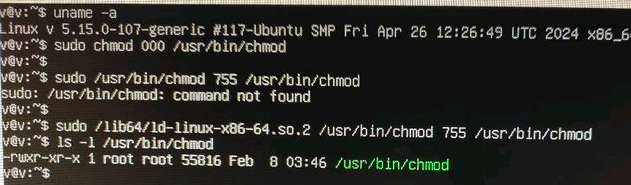
推上读到这个小技巧:Linux系统误将chmod权限改成了000,如何恢复?
答:不用慌,使用ld动态库调用chmod即可恢复。
我在我的 PopOS 22.04上实际测试了一下,目录
!image
推上读到这个小技巧:Linux系统误将chmod权限改成了000,如何恢复?
答:不用慌,使用ld动态库调用chmod即可恢复。
我在我的 PopOS 22.04上实际测试了一下,目录
/lib64 要改成 /lib, ld-linux-后面的部分也因系统而异,但这个解决方案确实有效。事实上,你一辈子也可能赶不上一回干这种蠢事,但知道遇到这种情况下仍然有简单的解还是很开心。sudo chmod 000 /usr/bin/chmod
sudo /usr/bin/chmod 755 /usr/bin/chmod
sudo: /usr/bin/chmod: command not found
sudo /lib64/ld-linux-x86-64.so.2 /usr/bin/chmod 755 /usr/bin/chmod
ls -l /usr/bin/chmod
-rwxr-xr-x 1 root root 55816 Feb 8 03:46 /usr/bin/chmod
!image
#unixtips
'Gow (Gnu On Windows) is the lightweight alternative to Cygwin,' <https://github.com/bmatzelle/gow>
and, <https://uutils.github.io> is another choice, which keeps all common utils that are rewritten in rust.
'Gow (Gnu On Windows) is the lightweight alternative to Cygwin,' <https://github.com/bmatzelle/gow>
and, <https://uutils.github.io> is another choice, which keeps all common utils that are rewritten in rust.